PHOTO CREDIT: LANTEK
Lantek, a global provider of software solutions for the sheet metal industry, continues its commitment to developing smarter, automated sheet metal software solutions with the launch of v. 45 of its Lantek Suite software. Designed to provide better connectivity across different factories and departments with improved API and Bend integration, this latest version includes safer part evacuation, flexible and reliable automatic nesting, and advanced multi-angle machining strategies for more efficient operations. Sheet metal facilities will experience greater nesting flexibility, machining and beveling for complex parts through a complete software offering that is built to address their needs. Here’s what’s new.
Lantek Expert
- The updated Stackmaster feature provides users with the ability to select from a wider range of lift devices for automatic evacuation of parts from the machine to pallets. While it retains all the functionality of the previous version, the updated module introduces several enhancements such as faster pick-and-place parts placement, 3D simulation, interactive graphical pallet layout definition and more. For sheet metal shops that run unattended, this module offers continuous operation.
- The Machining by Angle function allows users to define different machining strategies to each part programmed in Lantek Expert, including one strategy for every required angle. When the “Select Machining” option is chosen to preset angles, information is stored in the Lantek Database to be automatically applied whenever the part is nested at a certain angle, saving considerable time for those working with punching machines with a limited number of autoindex stations and machines with evacuation devices.
- Standard Bevel and 3D Bevel capabilities allow the definition of multiple bevel types within the same part. From the Lantek Expert v45 Drawing Module, users will be able to assign 3D Bevel or Standard Bevel to any element belonging to the same contour. For those working with complex beveled components, the 3D Bevel capability promises to simplify the definition process considerably.
Lantek Bend
- Lantek Bend v45 is fully integrated into the Lantek suite of sheet metal software products. Featuring a new user interface, this module connects seamlessly with Expert, Integra and Manager for unified workflow, digital continuity and full traceability.
- The new Bend Deduction interface is based on the Finite Element Method (FEM) which allows the user to add a specific scenario (tool, die, angle,) automatically adjusting the deduction and radius graph to reflect any additional data or scenarios for the most consistent and accurate bend deduction prediction across many machine models.
- Lantek Bend Integration allows users to send selected or active drawings directly from Expert, Manager or Integra to Bend where they can edit and simulate the bending process seamlessly. Data is captured and updates to the database are sent throughout the Lantek software suite for consistent unified workflows.
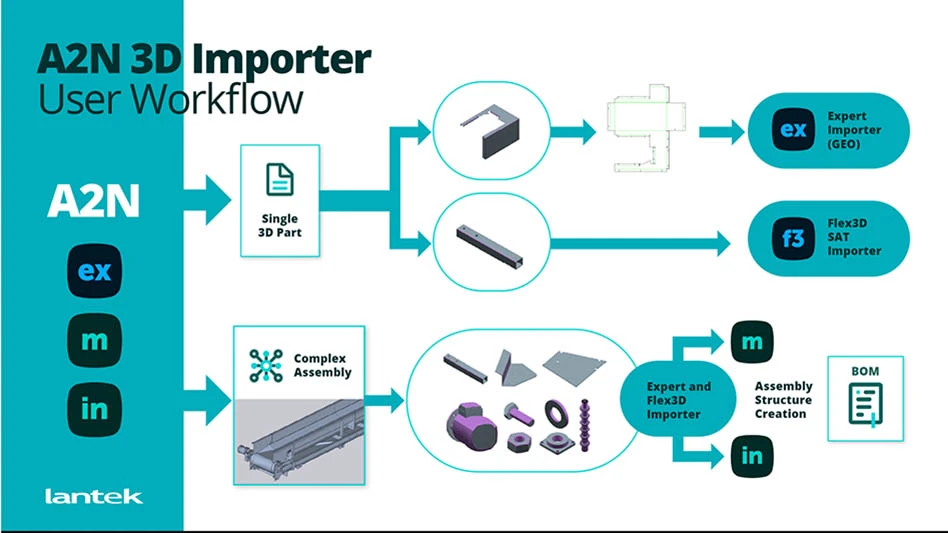
Assembly to Nesting (A2N)
- A2N v.45 features Tool & Die Filtering for Bend deduction. Rather than relying solely on fixed K-factor values or simple material/thickness-based bend deduction, A2N allows bend deduction values – or adjusted K-factors – to be calculated based on the specific tool/die combination used for consistent results, better bending control accuracy across different jobs, and standardization across different machines and operators.
Lantek Flex3D
- Lantek Flex3D now offers better nesting efficiencies and performance with enhanced assembly import management and new machining capabilities for machines with special features. A new nesting algorithm helps to save significant time by automating the nesting setup and nesting parts within the restrictions of each machine in a shop.
- Connections to the StruMIS MRP solution (via Tekla) are possible with the updated Flex3D function. Sheet metal personnel will be able to send project information such as production requirements and beam bars inventory availability to the Lantek software and Flex3D will generate nesting and machining paths, as well as material consumption and remnant data for a complete picture of the cutting process.
- Once again, integration is a key benefit to the updated Lantek v45. Its SOLIDWORKSÔ add-ins, Unfolding and Tube Joints Designer, are designed to help integrate files into Expert and Bend. It makes use of a single program to handle all functionality. In a single program, users can use the Tube Joints Designer add-in to automatically export to the Flex3D software with a unique export dialog window for 2D parts. Files are assigned an XML name after export to match the SOLIDWORKS file reference for better traceability.
Lantek MES v45
- Efficiency and organization are the goals behind the development of v45 of Lantek MES Management Enterprise Software. New features such as MES Manager link directly to the Production Planning module, pulling the list of production orders and keeping them synchronized for the most up-to-date information at one’s fingertips. The Automatic Scheduling system calculates start and finish dates for every order, taking into account work center capacity to avoid job overloads.
- Buffer and Operation Lag Times are addressed using Just-in-Time and As Soon as Possible modes for more efficient planning. A Gantt chart shows the job timeline organized by work center or by order, highlighting bottlenecks and delays for quick remedy of the situation.
- Intermediate Warehouse Improvements are visible using this function which offers a clear view of semi-finished stock – what it is, where it is located, cost, remnants, and traceability for the ultimate in operational efficiency. Users can also transfer semi-finished products between different intermediate warehouses easily.
- The Lantek MES v45 Web Version ensures that everyone is on the same page, needing to be installed only once on an organization’s server. Customized windows, reports, and all data are available to personnel with login credentials for easy access, saving time and ensuring that everyone has access to the same information.
Lantek Integra v45
- Material cost management and nesting flexibility are two of the smartest additions to Integra v45 offering users a powerful tool designed to simply daily work and create more accurate quotes. Material Cost Management maintains up-to-date material prices ensuring that quotes are aligned with market conditions. The Nesting Flexibility function delivers more precise handling of the nesting process for fair cost allocation and better efficiency for the best possible quotes.
- Advanced Material Cost Control offers transparent comparison between current material usage prices, and the last material stored price with alerts on discrepancies among other features.
- Enhanced Quotation Nesting Capabilities is a smart way to distribute nesting scrap quotations across parts accounting for shape and hole use, ensuring the fair and precise allocation of material waste. Users are able to combine additional costs with the quotation nesting method for specific or complex requirements.
Lantek iQuoting
- Lantek iQuoting is a comprehensive quotation management system that delivers end-to-end process coverage from simple part geometries to advanced multi-step manufacturing flows. This fully customizable system offers multiple calculation methods for each operation, including an automated cost breakdown that covers setup, execution and finishing times, and consumables for precise cost transparency. Additionally, a Dual Views function groups all parts involved in the same work center and operation by process and part and displays their manufacturing route and associated costs.
3D Parts Import and Unfolding & Import Assistant
The new 3D Import and Unfolding function addresses one of the most common bottlenecks in today’s quotation workflows by offering broader file compatibility via support for standard and native 3D formats. Faster response to quote requests reduce delays by eliminating the need to convert files or rely on external CAD systems. Additionally, costs are significantly reduced because 3D files can be processed directly, freeing engineering teams to perform other tasks. This key feature is delivered as a cloud services to seamlessly integrate into the iQuoting module.
The Import Assistant supports both 2D and 3D geometries, offering a guided workspace to preview and validate parts before they enter the quotation workflow. Users can visualize assemblies and their hierarchy to understand all components at a glance. They can also inspect individual parts in 3D to confirm geometry and orientation among other features.
"Our goal with v45 is to continue to empower factories to become more automated, more connected, and more intelligent," said Raúl Chopitea, Head of Product at Lantek Systems.